Not a general-purpose CRM with a synagogue skin. Aliyot, kiddush sponsorships, High Holiday seats, yahrzeits and membership tiers are first-class things here — because they were the first things built.
A single record per household — the couple, their children, the names they are called to the Torah by, and the yahrzeits you need to remember.
| Contact | Type | Outstanding | Credit |
|---|---|---|---|
| Aaron & Devorah Stein | Member | $1,240.00 | $0.00 |
| Miriam Feldman | Member | $360.00 | $180.00 |
| David Rosenbaum | Contact | $0.00 | $540.00 |
| Yosef & Rivka Adler | Member | $895.00 | $0.00 |
Illustrative data from the Beth Knesset demo congregation.
The part every other system gets wrong, because it was not designed for a shul.
Every pledge writes a matching charge into the ledger, and the two stay in lockstep for life. Change the pledge and the charge follows; correct the charge and the pledge follows. Cancel either and both are cancelled together.
A member pays $500 against six outstanding pledges. The system pays the oldest first, splits the payment across as many as it covers, and leaves the correct remainder on the last one — and it still reads as one payment to the member.
When someone overpays, or hands the office a cheque to draw down over the year, that money sits as account credit. The office can spend it against any pledge, ticket or fee from the same screen — and if the credit does not cover the amount, the system refuses rather than half-paying, because a partly-applied payment is far harder to unpick afterwards.
Every charge, payment, donation, ticket, refund and credit in one filterable list — with the standing of whoever you are looking at pinned to the top.
| Date | Type | Description | Amount |
|---|---|---|---|
| Aug 29 | Charge | Maftir — Shabbat | $36.00 |
| Aug 24 | Payment | Card ···4192 | $180.00 |
| Aug 18 | Ticket | 2× Adult — Elul Shabbaton | $80.00 |
| Aug 11 | Donation | Online donation (website) | $118.00 |
| Aug 02 | Refunded | Kiddush sponsorship | $250.00 |
The contact-standing summary above the ledger. Illustrative demo data.
Open a date at a price you choose, and let it be taken — from a member's phone, from the office, or by a stranger on your public website.
Events carry products; products carry prices. That is what makes the High Holidays a settings change rather than a development project.
No developer, no support ticket, no waiting for us. Somebody in the office does this between phone calls, and the website updates itself.
Title, date, time, location, a paragraph of description. Tick show on the Holidays page if it is a festival rather than an ordinary event, and it files itself there instead.
Upload the picture you already have. It appears on the card and opens full-size when a visitor clicks it, stored against your congregation alone.
Adult ticket, child ticket, a sponsorship level, a reserved seat — each with its own price, and a separate member price where members pay less. Set a capacity if the room has a limit, or leave it open.
The event is on your website immediately, with a working checkout. Every purchase lands in the ledger attributed to the buyer, and the office can still sell a ticket over the counter at whatever price it agrees.
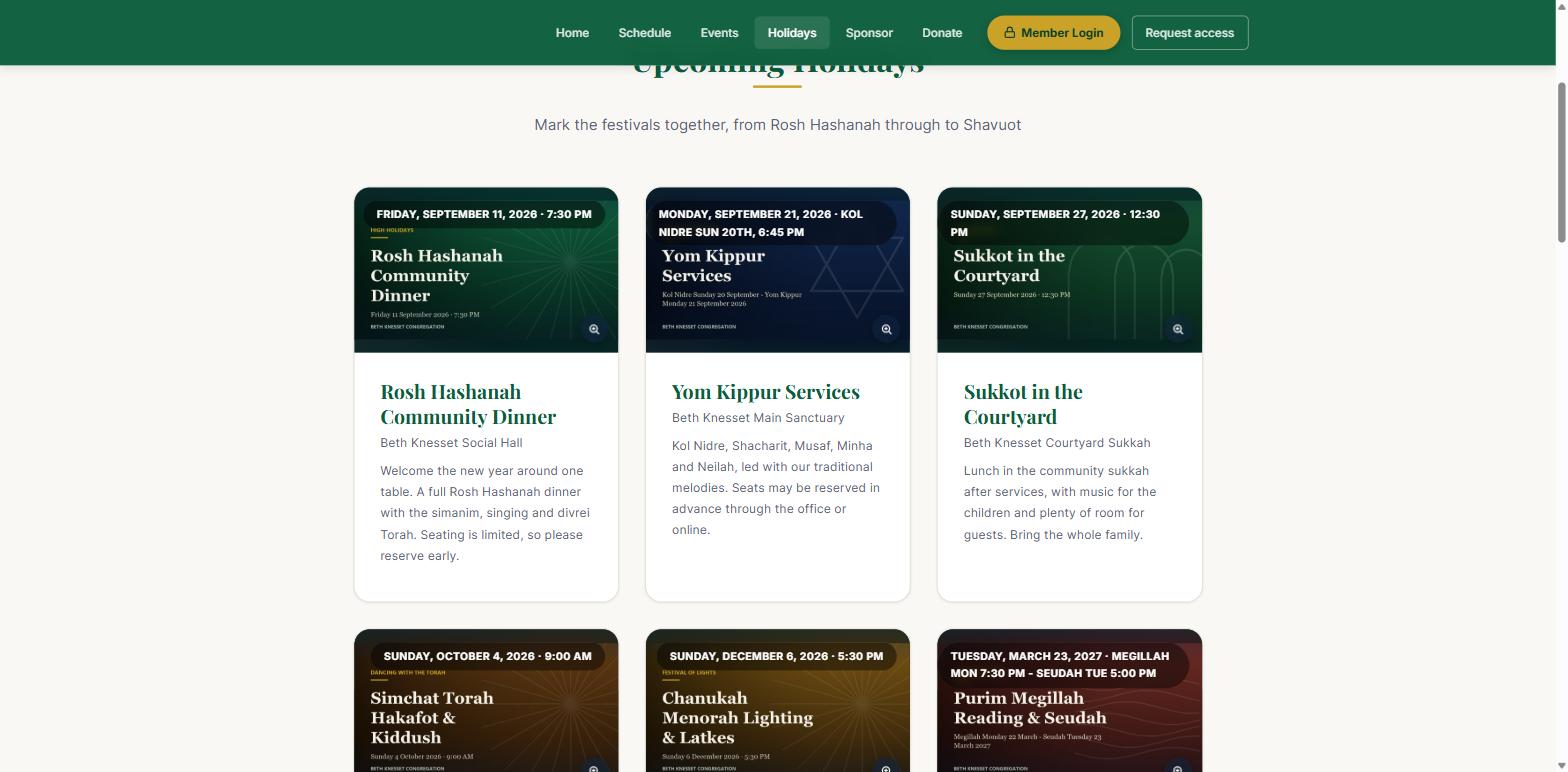
Holidays on the demo congregation's site. Each card is an event created in the portal with its flyer — nobody edited a web page to put them there.
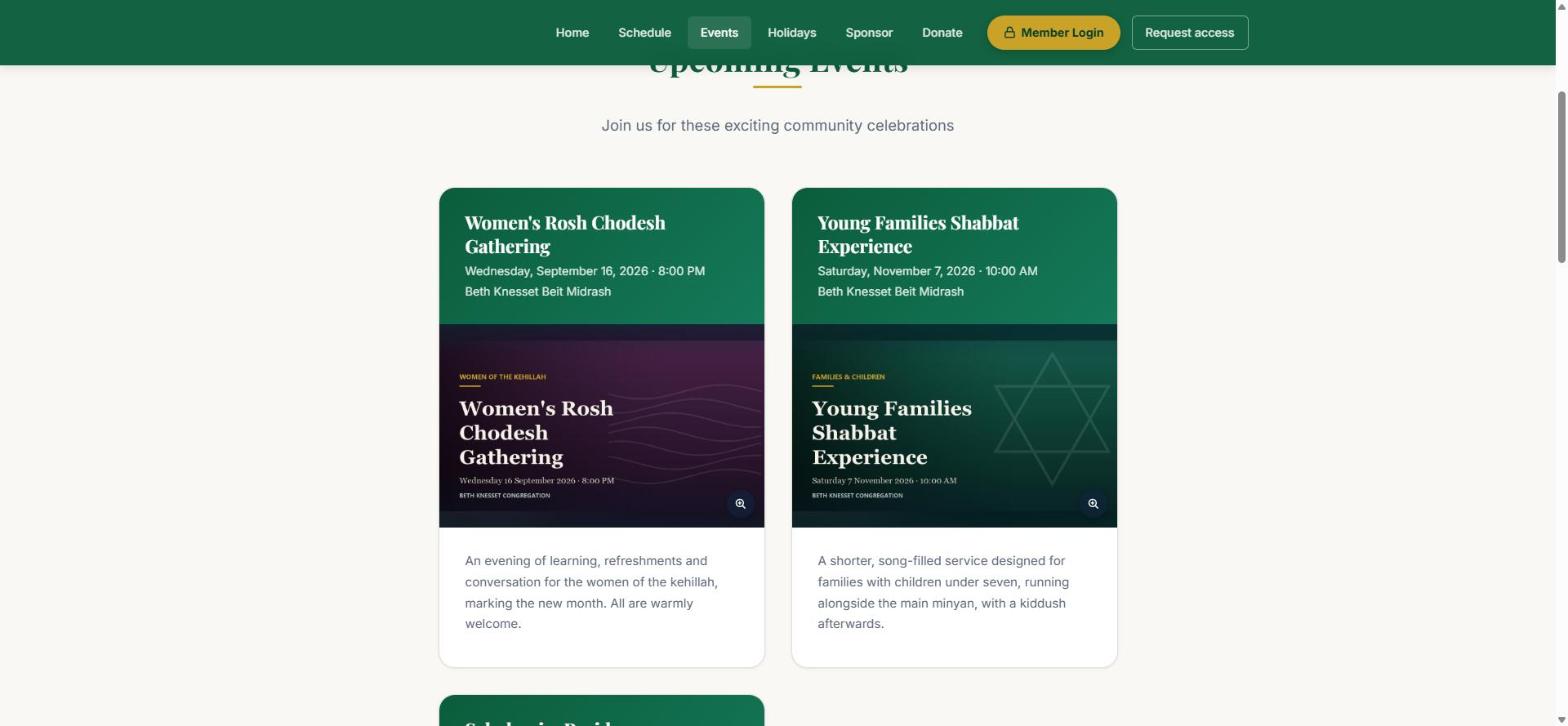
The same events on the Events page — festivals filed to Holidays, everything else here.
Prayer times, classes and shiurim, holiday schedules and sponsorship prices are edited in the portal exactly the same way — typed once, live immediately. The demo congregation's class timetable went from an empty page to six shiurim in the time it takes to type them.
Every obligation is a charge. Every payment is a payment. They net to a balance you can defend to a treasurer, an auditor, or a member on the phone — and every figure traces back to the row that produced it.
"Total paid this year" means exactly one thing, computed in exactly one place, and the member portal, the printed statement and the office ledger all call it. Three screens that quietly disagree is how a shul loses trust in its own numbers.
| Date | Detail | Charge | Paid | Balance |
|---|---|---|---|---|
| Jul 04 | Maftir — Shabbat | 90.00 | — | -90.00 |
| Jul 19 | Card ···4192 | — | 90.00 | 0.00 |
| Aug 02 | Membership — Family | 450.00 | — | -450.00 |
| Aug 09 | Cheque 2841 | — | 270.00 | -180.00 |
| Aug 16 | Donation — General Fund | — | 118.00 | -180.00 |
| Aug 29 | Opening the Ark — Shabbat | 180.00 | — | -360.00 |
The donation is money received but leaves the balance untouched — it settles nothing, because nothing was billed for it.
A member's own statement. Illustrative demo figures.
What each contact owes from unpaid pledges, at any moment — and the total across the whole shul.
A payment applied to the wrong pledge is moved, and both pledges recompute. Nothing is deleted to fix it.
Money back to the original card, the charge reversed, the pledge re-opened, the seat released.
Website, office and member portal are one ledger. Nothing to tie out at month end, because nothing ever diverged.
The biggest drain on a shul office is answering "what do I owe?" and "can you send me last year's giving?" Both stop being your job.
Every pledge, payment, donation, ticket and refund since they joined, with a running balance — at 11pm, without asking anyone.
Every payment triggers a confirmation written for the kind of payment it was — a pledge settled, a ticket bought, a kiddush sponsored.
Members who will never log in still get their statement by email, with a personalised link that opens on what they owe and lets them pay it.
Select everyone carrying a balance from the dashboard and send statements in one pass, watching the progress as they go. Each carries a pay-now link, so the replies come back as attributed payments overnight rather than as a stack of cheques to key in.
Members answer it themselves, at 11pm, on their phone — which is the only reason this pays for itself.
Every outstanding pledge, with the option to pay one, some or all of it — by card or from account credit.
A running balance they can follow, and a branded statement they can download without asking anyone.
See genuinely open dates and take one, without a phone call to the office.
Address, phone, children, yahrzeits. The office stops being a data-entry service.
Some members will not create an account, ever. They get a personalised link in an emailed statement that opens straight onto what they owe and lets them pay it — no password, no account. The link is cryptographically signed, expires, and is confirmed against their phone number before anything is shown.
The unglamorous machinery that decides whether a system survives contact with a real office.
| Capability | What it means in practice |
|---|---|
| Membership billing | Membership types and plans, recurring fees raised on schedule, and payments that settle them — kept separate from pledges so neither distorts the other. |
| Invoicing | Send statements to everyone who owes, from the dashboard, with live progress as they go out. Recipients can pay from the email. |
| Receipts | An emailed confirmation for every payment, written for the type of payment it was — and members can opt out. |
| Roles | Administrator, member and pledger. One person can hold several, and switch which portal they are looking at without changing what they are permitted to do. |
| Access requests | Someone asks for an account from your public site; an administrator approves or declines it in the portal. |
| Saved cards | Members can keep a card on file for next time. Only the last four digits and the brand are ever stored here. |
| Settings | Pledge types, occasions, payment methods, products, membership plans and sponsorship pricing — all yours to change, with concurrent edits merged rather than overwritten. |
| Several congregations | One login can serve more than one shul, with the data walled off between them. Useful for a shared bookkeeper or an umbrella organisation. |
| Works on a phone | Installable from the browser and built mobile-first, so the office is not chained to one desk during the week and members can pay from wherever they are. Nothing about the platform assumes a screen on Shabbat. |
We will load your membership list and a year of transactions into a private demo, and walk you through your own shul.